
Disclaimer: I was sent the following product in exchange for my thoughts. No further compensation was gained.

If you’re someone who does art, or you know someone who does art/illustrations you’ve no doubt heard about Wacom products. They’re pretty much the holy grail of pen tablets for your computer, making drawing digitally way easier than it is with just a mouse.
Trust me on that one, I taught myself out to draw on the computer using first an analog mouse with a ball in it, then a ball-less mouse. It’s not easy. Wacom tablets have been the gold standard (in my opinion) since they first started in the graphics scene. When I was younger I used to wish I could get my hands on one of their products, ever since I used one at a friends house. I’ve tried many different brands, usually lower priced ones of course, with a variety of mixed results. Not surprisingly, nothing has ever really come close to the feel, design, and quality of a Wacom tablet. 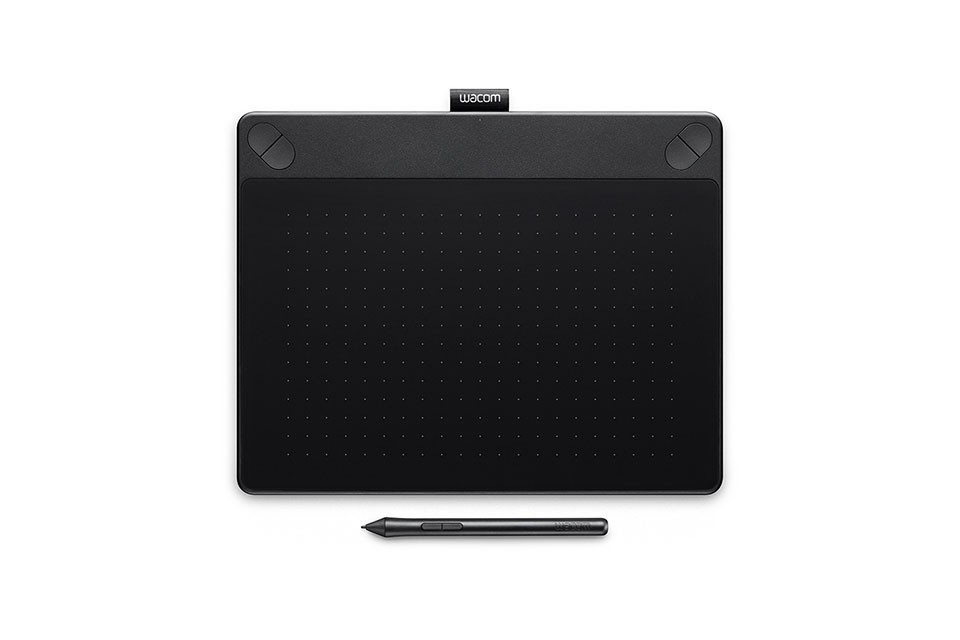
I started out drawing with a mechanical pencil and printer paper (all I could really get my hands on) when I was in 7th grade. Sure I’d doodled off and on over the years before that, but I really didn’t get more into drawing until middle school Despite all that, I didn’t actually get my first Wacom tablet until about 2010/2011, and I got a wonderful little Bamboo for Christmas and loved it. I got busy with life and didn’t get to use it too much, and I let Kat and Sisi use it. Sadly, the cord eventually wore out and that was the end of that. Kat sort of has a bad history with product cables. >.> They tend not to last long.
I was so excited to get the chance to get another Wacom product, this time it is the Intuos Art in the Medium size.
The set up of this tablet is just so darn easy. Really, some of the cheaper tablets cause so much darn drama that you want to give up when it comes to installing them. Not this one, thank goodness, because it was pretty late at night when I decided to go ahead and set it up.
The tablet offers 4 express keys, is wired but can go wireless with an accessory kit (which I am getting as soon as I can afford it), and offers an active drawing area of 8.5 x 5.3 in. I don’t usually use the entire surface area of a traditional printer paper sized piece of paper when I draw anyway. So it wasn’t too hard for me to get comfortable with the active area of the Wacom Intuos Art.
I’m embarrassed to admit that I’ve had the tablet a couple of months now but haven’t exactly taken the time to do more than doddle or play around in photoshop and get used to using it. Since it’s been so long for me between using a pen tablet for drawing and just using paper, and I’ve had a bit of artist block. I don’t have a lot to show aside from some doodles.

I do love getting to use the tablet though, and I really hope I can get out something nicer to show everyone soon. For now, I want to say that I highly recommend looking into the offers Wacom has on tablets for the artist in your life. Even if they’ve never used a pen tablet for the computer before, the Intuos is an amazing product to start with.
Do you have someone in your life that loves to draw? Or are you the artist in your life? Have you ever gotten to use a pen tablet for the computer before, if so, what did you think?


My sister is the artist in our family and she would LOVE this. I think I should get her one for Christmas this year 🙂
My son loves to draw and be bought him a table several years ago. I doubt it’s as good as this one and I’m sure it’s time to upgrade. It would make a great Christmas gift.
This is something I need for tablets. I’m not much of an artist but this could help me a bit in drawing on tablets.
This sounds so cool. My daughter loves to draw so she’d love something like this. I love your drawing!
My youngest daughter loves to draw and do any sort of art. She just got selected for the art show next week. She would love something like this.
You’re quite talented, I must say! Beautiful graphics you’ve created… I have a friend who would love this too and it would really benefit her blog!
I would love something like this! I love to draw and since I’m on the computer so often it makes sense that I should draw while sitting at the computer. I might add this to my Christmas list.
I would love to have something like this. I think it would be so great to have in our homeschool class room.
This sounds like such a fun, cool way to draw and create masterpieces. My daughter is obsessed with art. I definitely need to check this out!
My daughter always wanted one of these tablets. She has always really been into art, especially drawing.
Wow, this sounds like such a great resource to have if you are artistic. I enjoy drawing, painting, and coloring with my kids, but I never make anything too advanced. It is very therapeutic, though.
My son would really love something like this. Technology is so fascinating at times.
Oh my niece would love this! I have to let my sister know so she can get this for her for Christmas. My niece shows a lot of talent in sketching and painting. She also has a knack for learning new languages. Right now, she is studying Korean.
This looks really good, I cannot draw to save my life so would be wasted on me. I know my son would absolutely love it but at just 5 years old he can have an etch a sketch haha seriously though this sounds likea great product I hope you enjoy it.
Oh my goodness, if that pic is just you doodling, I’d love to see what you create when you’re not doodling! I’ve always wished I could draw or paint. I have these grand ideas in my head, but lack the mechanical ability. That tablet is perfect for artists!
I would love to try a drawing tablet! I think that would be so much fun and make such a great Christmas gift!!
I wish I could draw worth snot. This is so cool and if I were good at art I would own it!
I own a Wacom Intuos 3D MEDIUM and I would say it is probably better than I thought. It sped up my drawing process and on an average, I found an increase in the quality of my drawing. In the beginning, it surely has a learning curve but once you get over it you will have a buttery smooth experience.
For all the artist not using it plz. get it, totally worth it.
Interested in art and art lover people’s first choice wacom drawing tablet brand i think. Because its size and pad sensitivity is better than others i would like to say. Loved your post because you you have given such important info.
Thank you so much.
Keep it up.
I would love to draw a Dog for my brother. Nice guide
You’re very skilled, I should say! Excellent illustrations you’ve made… I have a companion who might cherish this as well and it would truly profit her blog!